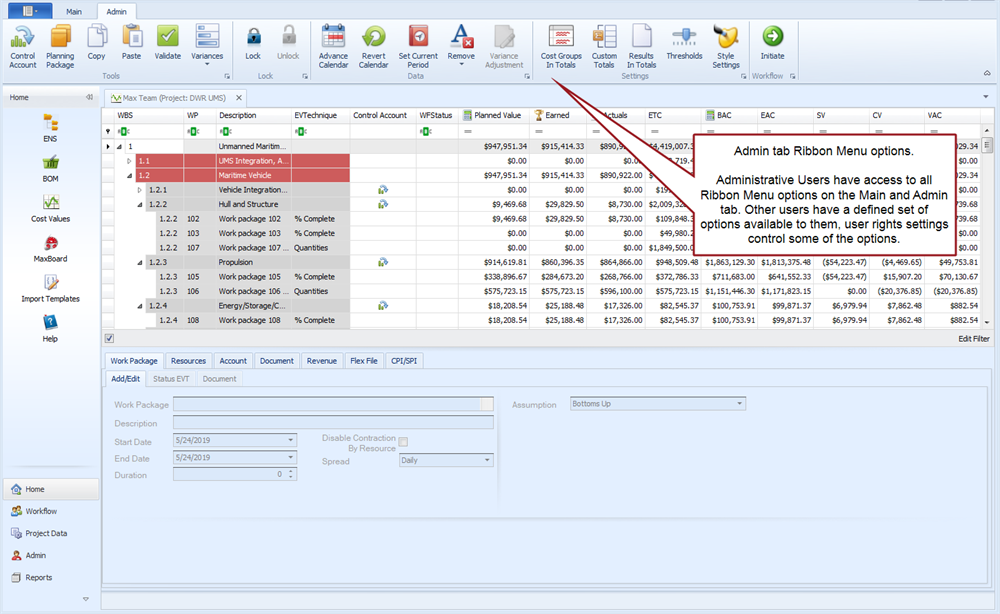
Main EVMax Window
The main EVMax window is where you enter, import, and maintain your time phased cost data for a project including budget, earned value, actual costs, and estimate to complete. It is a row and column grid view similar to Excel designed to help you enter, view, or maintain base cost values (FTE, hours, or direct cost results) and calculated values (indirect cost results) using the framework of the project work breakdown structure (WBS). The time phased budget data is the foundation for assessing project performance and calculating earned value once work begins on the project. The cumulative to date actual costs plus the estimate to complete the remaining work assist in determining the project's likely estimated cost at completion.
You can also enter documentation text for the work elements at the account (WBS/control account) or work package level. This is dependent on what standard documents you may have defined for your project. This documentation is stored in the database with the time phased cost data so you can easily produce reports that combine the time phased data and documentation text.
 Options for Creating Budget Data
There are a number of ways to enter or create the time phased budget data in EVMax.
The recommended approach is to import an existing project from BOEMax into EVMax. This is the easiest way to create a new project and quickly establish the budget data in EVMax because you are importing the complete data structure, calendar, rates, resource structure, bills of material (BOMs), time phased cost estimate data, and documentation. The cost estimate data becomes the budget data in EVMax. Using BOEMax and EVMax together is also the best way to maintain the budget data for the life of the project using the built-in workflow process to manage your changes. That way BOEMax automatically maintains a historical archive of the changes to the original budget.
Otherwise you can enter and maintain your budget data in EVMax independent of BOEMax. You can:
- Import the resource loaded activity data from a scheduling tool. The import process creates the work package, resource assignment, and base result value data in EVMax.
- Enter the budget FTE, hours, or direct cost base result values for the resources assigned to a work package in EVMax. Typically FTE and hours base values are entered for labor resources. Direct cost base values are entered for non labor resources such as material and travel. The assigned rate structure and resource structure determines how other results such as direct cost and overheads are calculated for you. You determine the start and end dates and how the values are time phased when you create your work packages.
- Copy selected WBS element or work package rows and paste the data to another WBS element or work package in the same project. You can select whether to include user field content, resource assignment and value details, and documents when you paste the data from one work element to another.
- Import the project data using a template.
- Create a copy of another project with the time phased data included as the basis for a new project. See Manage Projects.
Maintaining Other Time Phased Cost Data
Once you have established the budget data for your project and the execution phase of the project begins, for each reporting period you can:
- Advance the Calendar to the next calendar reporting period end date (current time now).
- Calculate earned value based on the work package earned value technique and work progress. You can also import schedule activity status as the basis to determine the work package percent complete and calculate the earned value.
- Import actual costs from your accounting system.
- Maintain the estimate to complete the remaining work effort.
As an option, you can also create user defined cost codes for estimated actuals should you need to track actual costs and estimated costs. Estimated costs are often used when the actual costs are lagging in the accounting system and earned value has been claimed for the current reporting period. This often occurs with material, purchased services, or purchased equipment. The estimated cost values are replaced with the recorded actual costs from the accounting system when they become available.
What do you want to do?
- Customize the EVMax window. See Window Configuration.
- Create the Budget data
- Maintain the budget data using the Change Control Workflow Process
- Calculate Earned Value as part of the routine status and analysis cycle
- Import Actual Costs as part of the routine status and analysis cycle
- Maintain the Estimate to Complete
- Conduct Performance Analysis or Financial Analysis to proactively manage the project's work effort, resources, and cash flow
EVMax Window
Main tab menu options
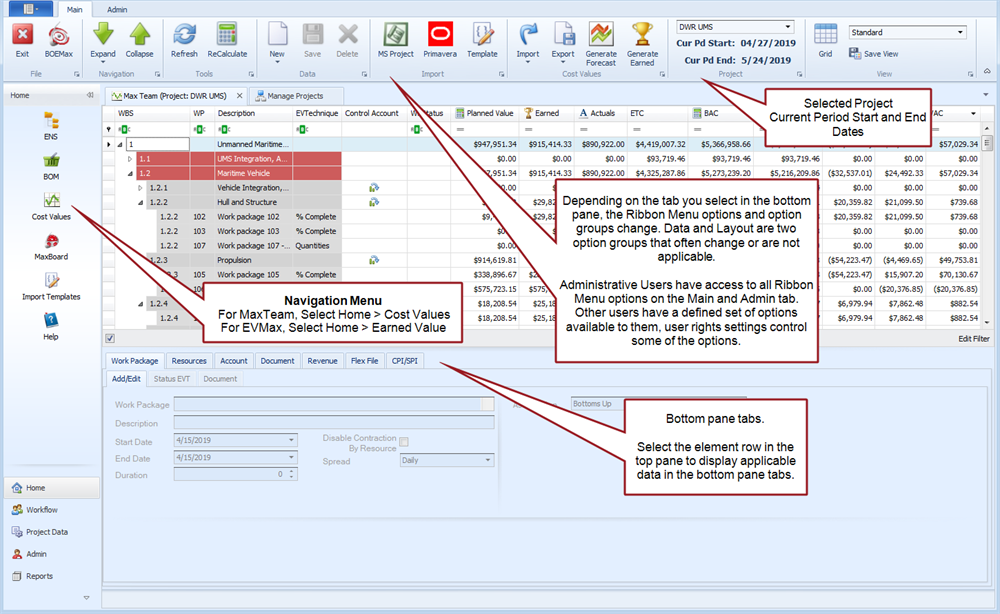
To customize your view, see Window Configuration.
Standard View options
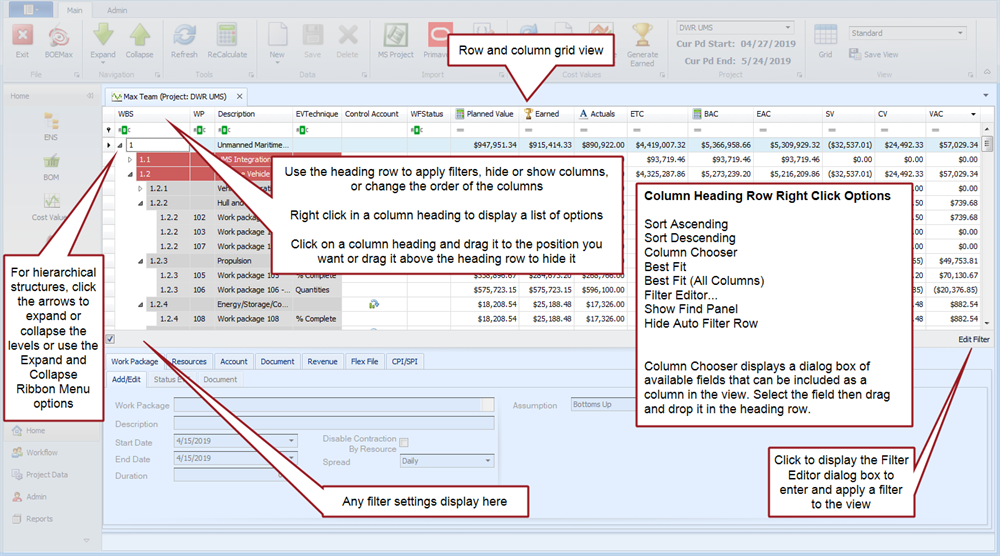
Unless otherwise noted, steps describing how to use the various main EVMax window options assume you are using the Standard View.
Admin tab menu options